
Project Management
How To Build ClickUp For Agencies
Project management tools are essential in today's digital world, especially in the creative agency industry. With the rise of remote work, coordinating tasks and tracking progress have become increasingly complex, but also crucial. ClickUp, a versatile cloud-based project management platform, can effectively cater to agencies' unique needs. Here's how you can build and optimize ClickUp for agencies.

Introduction
In the bustling digital realm, each tool carries its own weight, especially in the creative agency landscape. Meet ClickUp, a cloud-based project management platform. More than just your run-of-the-mill project organizer, ClickUp has turned heads with its versatility, positioning itself as the go-to instrument for agencies eager to optimize their workflows.
But why, exactly, are project management tools, such as ClickUp, crucial for creative agencies? Think teamwork. Think coordination. In the age of remote work, managing tasks and keeping track of progress can resemble herding cats. It's complex. It's all over the place. But with robust project management software like ClickUp, this chaos can be streamlined into order.
No longer are tasks miscommunicated or deadlines slipped through the cracks, no more scrambling for updates or chasing feedback. ClickUp steps in to bring structure, to make remote collaboration more manageable, and to ultimately keep the cogs of the creative agency turning smoothly.
Now that you've had a brief introduction to ClickUp and the importance of project management software in the world of creative agencies, let's delve deeper.
Understanding ClickUp for Agencies
ClickUp is a versatile project management tool that is jam-packed with features tailor-made for agencies. So what makes it so suitable for the agency environment?
One standout feature is ClickUp's customizable hierarchy. It lets you structure your workspace according to your agency’s specific hierarchy. You could have a design team, a content team, a web development team, and so on, each with their respective workspaces. This kind of setup makes it super easy to assign tasks, monitor team performance, and improve collaboration.
This division of workspaces also comes with hierarchical view options; you can view tasks for the whole agency, for specific teams, or even dive down into individual assignments. This kind of micro to macro view spectrum is incredibly handy when you've got a mix between overarching agency tasks and specific team duties.
Then there's also the ability to tag, filter, sort, and prioritize tasks so you can organize your workflow in a way that best suits your needs. Need to see who's holding too many tasks? Or maybe which projects are taking longer than estimated? ClickUp has got you covered.
And, let's not forget about integrations. ClickUp sets itself apart by playing nice with all your favorite productivity apps like Google Drive, Slack, and even aesthetic tools like Adobe Creative Cloud. No more slugging through emails or juggling between different apps to find the information you need.
All these features are super easy to use, but the real kicker is that they're combined in one platform, which results in improved synergy, team coordination, and overall project success. When you overlay an agency structure onto ClickUp, it comes to life as a dynamic, intuitive command center for your creative workforce. Therefore, understanding ClickUp is the first step towards mastering project coordination in an agency setting. Let's move to build that hierarchy next.
Building Agency Hierarchy in ClickUp
When it comes to handling multiple projects, clients, and teams, a clearly defined agency hierarchy is essential. The hierarchy isn't just about who reports to whom; it's a well-structured system that determines the flow of tasks, information, and decision-making processes. This layout helps avoid confusion, enables better task distribution, and ultimately leads to improved workflow efficiency.
Setting up an agency hierarchy in ClickUp isn't a daunting task. It is intuitive and customizable to your agency's structure. Here are some simplified steps to help you create that structure:
- Create Your Spaces: Start with setting up your 'Spaces' based on the broad teams or departments in your agency like 'Design', 'Content', 'Marketing', and so forth. This categorization forms the top level of your hierarchy.
- Carve Out the Folders: Within each 'Space', you can create 'Folders' which further define your projects or campaigns. For example, under the 'Marketing' space, you could have folders like 'Social Media', 'SEO', 'Email Marketing', etc.
- Define Your Lists: Inside these folders, create 'Lists' for specific tasks related to the project. In the 'Social Media' folder, lists can be 'Facebook Ads', 'Instagram Stories', etc.
- Add Tasks and Subtasks: Under each list, fill in tasks and subtasks with clear task descriptions and due dates. Assign them to the team members responsible.
This step-by-step stratification of Spaces, Folders, Lists, and Tasks helps give a clear roadmap to each member of the agency, knowing exactly what they need to do, when they need to do it, and who they report to.
Well-structured agency hierarchy in ClickUp also has a positive ripple effect on your workflow. Clear task allocation prevents duplication of work and overlooked tasks, while the hierarchical view fosters better understanding of larger projects and goals. This visibility leads to higher productivity and ensures no task go missing.
A well-ordered structure also enables seamless collaboration among teams, as everyone can easily track task progress, add comments, or attach files. This team-wide clarity spurs efficiency, making ClickUp an ideal choice for agencies seeking to streamline their management systems.
Utilizing ClickUp Digital Marketing Management Features
Distinguished by its comprehensive toolbox, ClickUp cordially invites agencies to explore a plethora of features designed specifically for managing digital marketing tasks. When maneuvered correctly, these features can drastically ameliorate your team's productivity and project turn-around time. Let's break it down further.
First up, we have the 'Custom Statuses.' ClickUp allows you to customize the stages of your tasks or projects according to your agency’s unique workflow. You could set the digital marketing stages as ideation, conceptualization, design, testing, and delivery, allowing your team to keep track of a campaign’s journey from its conception to final execution seamlessly.
Then, there's the 'Docs' feature. Consider this your collaborative playground infused into the system. It's particularly handy in organizing your content marketing calendar or composing blog posts collaboratively. The real-time collaborative editing blends in perfectly and ensures that your team's creative juices are preserved through effective collaboration.
Another standout feature is the 'Time Tracking' tool. This feature allows you to keep an eye on time spent on different tasks, making it significantly easier to analyze productivity and keep billable hours in check.
Further in the mix is the 'Goals' feature where you can set specific, measurable, and time-bound objectives for your campaigns. This keeps the team aligned and makes it easy to judge the success of your digital marketing efforts at a glance.
Lastly, but certainly not least, the 'Reporting' feature. The ClickUp dashboard and reporting feature provide a wealth of graphic insights into your digital marketing progress. This includes breakdowns of individual tasks, time spent, workloads, bottlenecks, and other key metrics that can immensely assist in decision-making or spotting potential red flags.
Suppose you're managing a new SEO campaign. To illustrate, each of these features can be implemented in different stages. You can initialize 'Custom Statuses' to outline the campaign's lifecycle, use 'Docs' for brainstorming and drafting content, employ 'Time Tracking' to monitor the time invested on the project, set 'Goals' to align the team's efforts towards defined objectives, and finally utilize the 'Reporting' functionality to gauge campaign success and areas of improvement.
And there you have it, the fusion of these prolific features effectively transforms ClickUp into a digital marketing powerhouse. Remember, the key is to mold these tools around your agency's unique needs for that winning strategy.
Why ClickUp is the Best Project Management Software for Creative Agency
Indeed, project management is more of a systematic art than a chaotic dance in creative agencies. It entails the meticulous coordination of ideation, execution teams, timelines, and resources to create beautifully engaging creative content. As such, creative agencies have unique project management requirements, which veer off considerably from other industries. These commonly include flexible team collaboration, streamlined project workflows, resource allocation, and time tracking capabilities, among others.
This is precisely where ClickUp excels by establishing itself as a project management software powerhouse tailor-made for the creative industry. Here are some of the reasons behind ClickUp's prowess in aligning with creative agencies' specific needs.
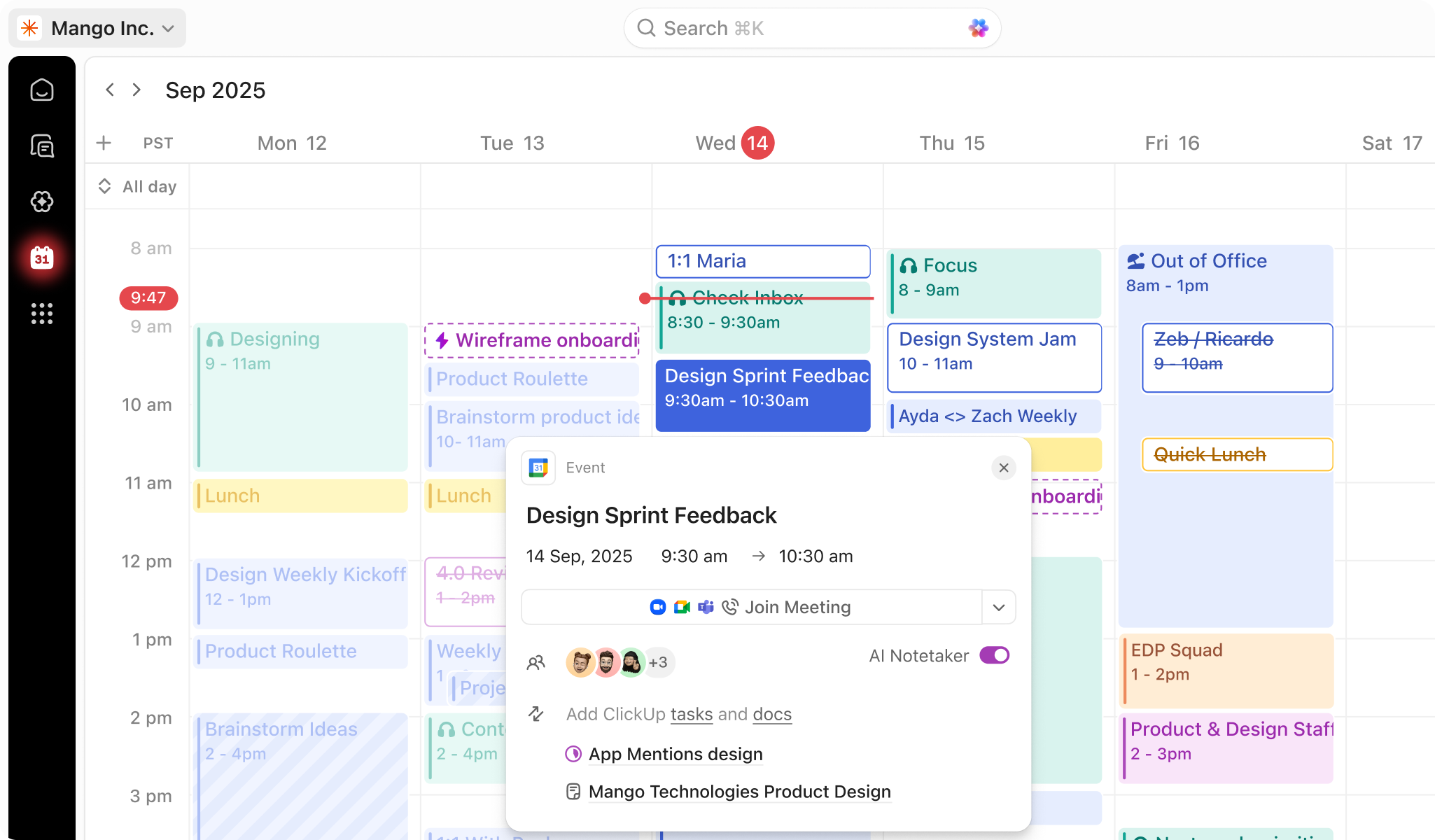
To start with, ClickUp's versatility allows it to accommodate various styles of workflow, be it Agile or Waterfall, all within a single platform. Additionally, the platform supports a diverse set of views, including List, Board, Box, Calendar, and Gantt views, offering visual variations tailored to an agency's details. This flexibility ensures that teams don't have to adapt to the software; instead, the software adapts to them.
One other remarkable feature that makes ClickUp stand out is its built-in time tracking capability. This functionality allows creative agencies to meticulously manage time spent on tasks, facilitating improved time management and productivity gains.
Moreover, ClickUp aligns itself with creative agencies’ needs through a sleek user interface which fosters ease of use, leading to seamless onboarding and adoption. Thanks to this, continuity of creative processes and projects is guaranteed with minimum disruption even in the learning phase.
Floclick's in-depth analysis on 'how to use ClickUp for project management' further bolsters this stand. It highlights how intuitive and user-friendly the platform is, making it easier for creative teams to collaborate and map out their projects without wrestling with unwieldy software.
Lastly, ClickUp is renowned for its robust integration capabilities. It seamlessly integrates with other tools commonly utilized in creative agencies, such as Slack for communication, Google Drive for document storage, and Adobe Creative Suite for design tasks. This ease of integration pulls down silos, optimizes collaboration, and enhances overall team productivity within the creative agency.
Therefore, factoring in its in-depth customization features, user-friendly interface, integration flexibility, and time tracking capabilities, ClickUp shows itself to be one of the best project management software pieces custom-built for creative agencies' unique ecosystem.
How to Optimize ClickUp for Agency Use
Unleashing the full potential of ClickUp for agency use requires more than just understanding its unique features and functionalities. You also need to optimize it to align with the dynamic demands of agencies' operations.
Maximizing ClickUp's Features
Here are some ways you can maximize your ClickUp experience:
- Utilize Custom Views: Tailor your workspace to suit your needs with ClickUp's custom view feature. This includes:
- Gantt charts for tracking project timelines
- Board views for workflow visualization
- Me-mode for personal task management
- Leverage ClickUp Docs for Collaborative Editing: Use ClickUp Docs for idea generation and strategizing. It acts as a centralized knowledge hub, promoting efficient communication and collaboration.
- Use Custom Fields for Agency-Specific Data: Track agency-specific data using ClickUp's customizable fields. This is ideal for logging details such as budget and project stage.
- Automate Recurring Tasks: Free up your schedule by automating repetitive tasks, such as weekly team meetings or bi-weekly client reports.
Integrations and Support
- Integrate ClickUp with Essential Tools: Enhance your team's productivity by integrating ClickUp with frequently-used tools, such as Google Drive, Slack, and Zoom.
- When in Doubt, Check the ClickUp Help Center: The ClickUp Help Center is a comprehensive, searchable tool for troubleshooting any issues you may encounter.
ClickUp Mistakes to Avoid
However, keep in mind that effective use of ClickUp also involves avoiding common mistakes:
- Overcomplication: This can lead to confusion and undermine the advantages of using ClickUp. Stick to simple, easy-to-follow workflows.
- Ignoring the Foundational Hierarchy: Failing to understand the software's hierarchy
- can lead to inefficient procedures. Make sure to outline clear SOPs (Standard Operating Procedures) and train your team effectively.
With these tips at their disposal, any agency should be able to navigate through ClickUp effectively, boosting overall organization, collaboration, and productivity.
Conclusion
Having traversed the multifaceted landscape of leveraging ClickUp for creative agencies, it's clear that this dynamic project management software packs a potent punch. It's specifically designed to address the pressing demands of modern creative businesses, simplifying complex tasks and fostering efficiency.
We've delved into the core steps of building an agency hierarchy in ClickUp, the uses of its digital marketing management features, and why it emerges as one of the best project management tools tailored for creative agencies.
We also unearthed various tips and tricks to optimize ClickUp for agency use and identified certain pitfalls to sidestep. Remember, correct implementation and mindful utilization of ClickUp can drastically improve your agency's workflow, coordination, and productivity.
In summary, agencies on the rampage for effective project management software may find their holy grail in ClickUp. By aligning the software's capabilities with your agency's needs, you can establish a harmonious rhythm of work that strikes a balance between organization and creativity.
So, creative agencies, it's about time you consider trading your one-size-fits-all project management tools for the robust, versatile, and agency-optimized platform that is ClickUp. Embrace next-level project management and begin focusing more on what truly lights your fire, creating.


